
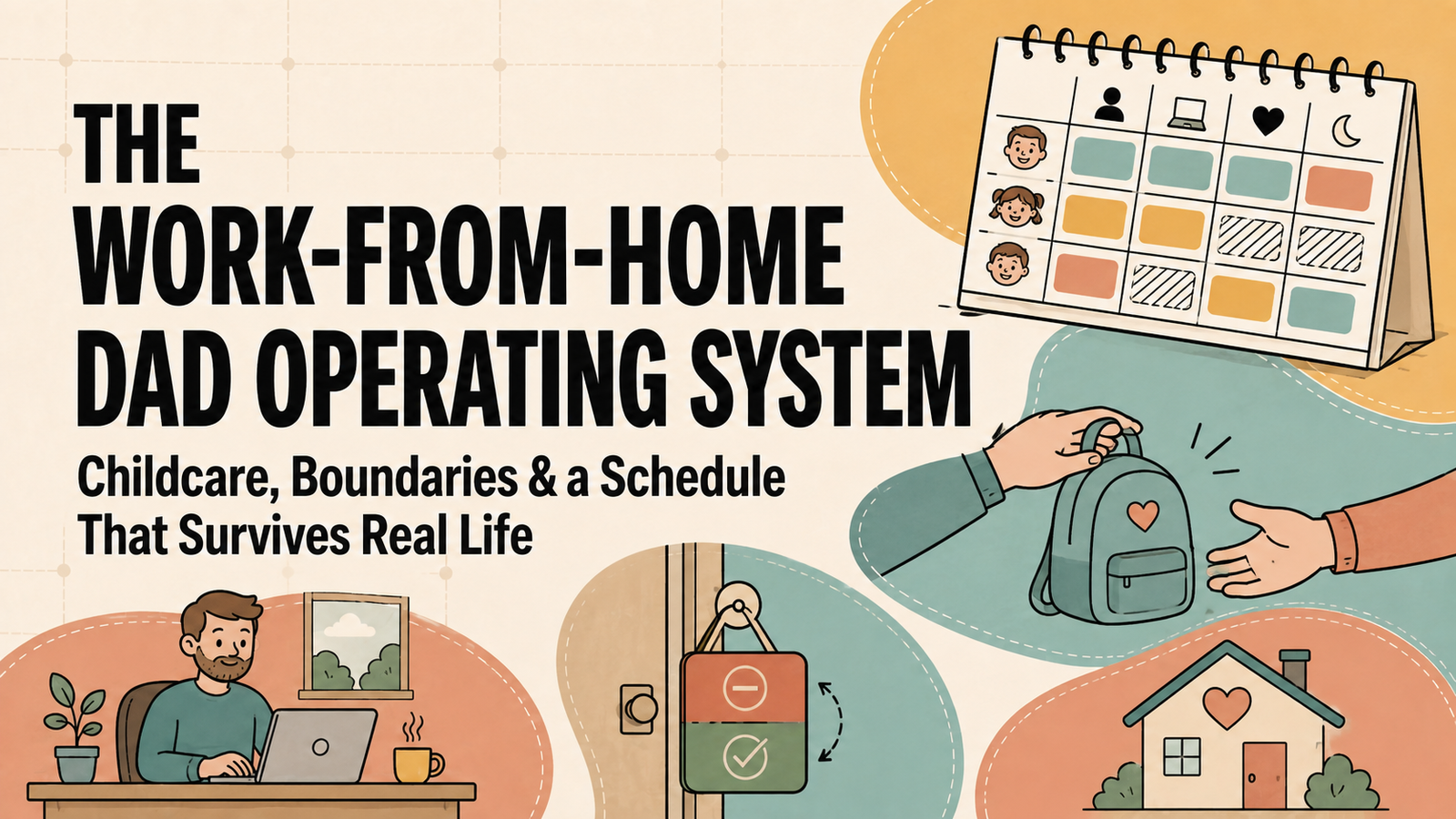
The Work-from-Home Dad Operating System: Childcare, Boundaries and a Schedule That Survives Real Life
Editorial note: This article is an updated version of an article I originally wrote and published on my earlier blog, Productive Superdad, which no longer exists. I used AI to help restructure, rewrite, and expand it for Smart Remote Work, which I’m restarting after stepping away from blogging for a few years. The underlying ideas, experiences, and perspective are my own, and I reviewed and edited the final article before publication.
One more thing: this guide uses “dad” throughout because that’s my own lived experience and the lens I’m writing from. But nothing here is dad-specific — the coverage maps, the flexibility reserve, the interruption levels, and the weekly reset all work the same whether you’re a mom, a dad, or any other primary or co-parent making remote work fit around your kids. Swap in your own household’s details and the system holds.
You finally landed the dream setup: a home office, a flexible schedule, zero commute. Then your toddler discovers your laptop camera makes a great mirror during a client call.
Working from home with kids sounds like the ultimate productivity hack, until interruptions stack up and your to-do list quietly turns into a to-don’t list.
Every work-from-home dad hits this wall eventually. The tools are in place, the intentions are good, but the actual hours in the day refuse to cooperate with a toddler’s schedule.
Here’s the promise of this guide: work-from-home dad productivity isn’t about squeezing useful tasks into every spare minute. It’s about building a family operating system in which childcare, work commitments, boundaries, handoffs, and recovery all support one another.
Below you’ll create reliable coverage, decide how your household handles interruptions, coordinate with your partner or support network, set expectations at work, and close the day without dragging the office into family time.
Quick Answer: The Six Parts of a Work-from-Home Dad Operating System
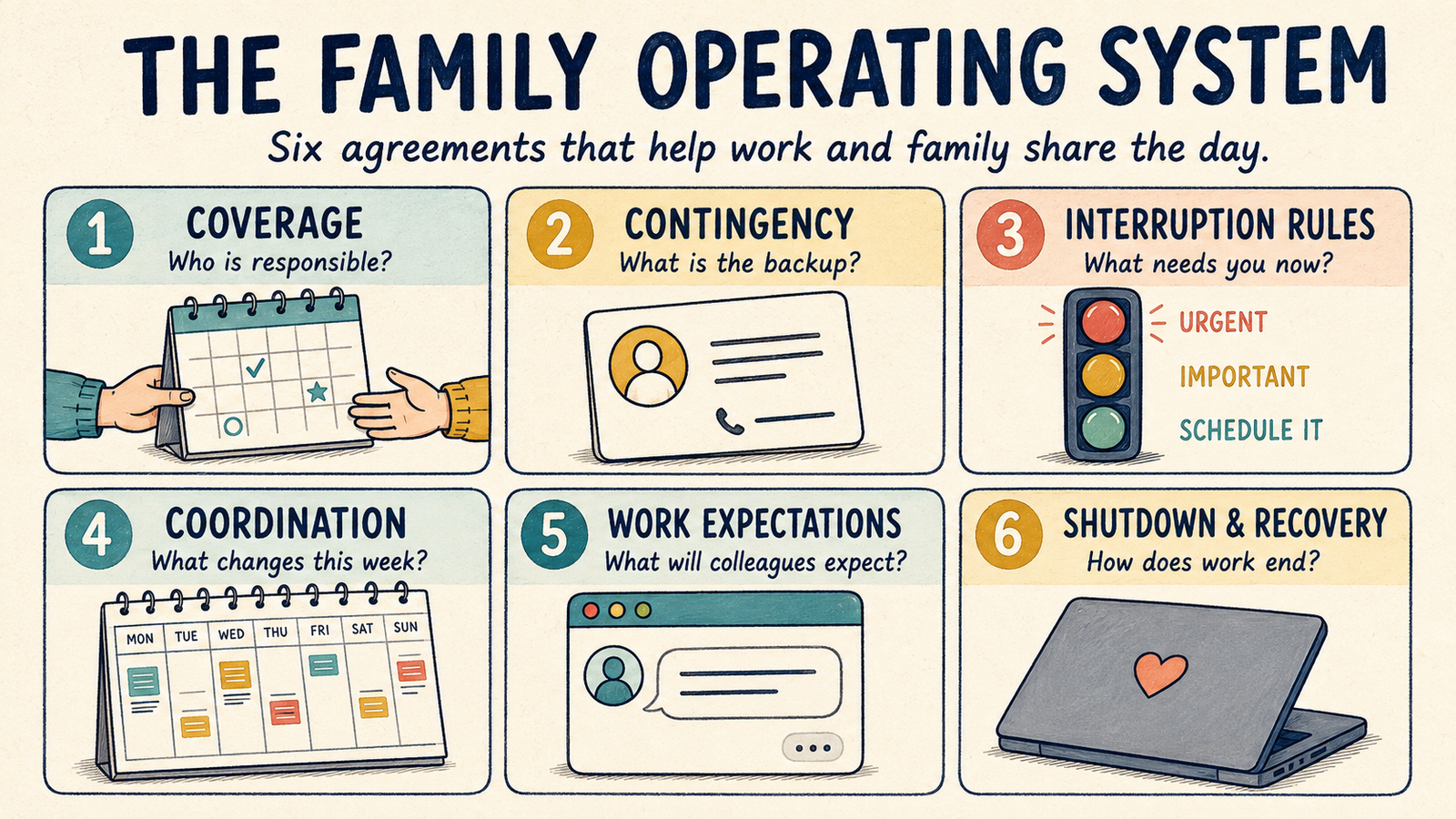
A sustainable setup is less about a perfect timetable and more about six agreements that keep work and family life from competing blindly.
- Coverage. Decide who is actively responsible for the kids during every protected work block.
- Contingency. Build a flexibility reserve and a backup childcare plan before the week becomes complicated.
- Interruption rules. Agree on what is minor, what needs a handoff, and what stops work immediately.
- Coordination. Run a short weekly reset with your partner, or a solo planning version with your support network.
- Workplace expectations. Tell your manager or clients how availability, response times, and outcomes will work.
- Shutdown and recovery. End work deliberately, reconnect with your family, and protect enough personal capacity to repeat the system tomorrow.
Before You Begin: Get Honest about What Working from Home with Kids Actually Means
Stop treating your remote job as a childcare substitute, even by accident.
Working from home with a toddler underfoot is not the same as having a nanny, a daycare spot, or a partner at home to parent.
Your employer is paying for your attention, not your babysitting. Blur that line for too long, and you get half-finished work, a frustrated kid, and a guilt spiral that ruins your evening.
Write down your actual weekly coverage: which hours are truly work hours because a caregiver, a nap, or a school day has your kid handled, and which hours are “working while parenting,” where you should expect interruptions and lighter output.
Be honest about the gap. If most of your week falls into the second bucket, that’s a childcare problem to solve, not a productivity system to optimize around.
Timo: What Made My Focused Work Possible
That distinction mattered in my own life. In 2012, my son was one year old, and I was working from home while holding a day job — my wife covered childcare during my work blocks, and that coverage, not discipline or a clever productivity trick, was what let me focus.
I was laid off soon after, spent the next few years building my former blog, and landed a new job again in 2016.
Two very different chapters, same lesson: the system holds up because someone genuinely has the child covered — not because dad found the right hack.
A Note About Single Parenting and Limited Support
I’m not a single parent, and I can’t speak to that experience firsthand.
My own situation was a two-adult household: when I worked from home with a toddler, my wife handled childcare during my work blocks, and that support is what let me focus fully.
- The ideas below are planning suggestions, not lessons drawn from single-parenting experience. Depending on your circumstances, possible sources of coverage might include paid childcare, trusted relatives, reciprocal arrangements with other parents, community services, or negotiated flexibility at work — though some of these options may be unavailable, unaffordable, or unsuitable for your family.
- This framework isn’t meant to suggest every household has the same choices. It’s meant to help make the real constraints visible: which hours genuinely have coverage, what kind of work fits the remaining periods, and what backup options — if any — are realistically available.
Part 1: Map Coverage and Handoffs Instead of Chasing a Perfect Schedule
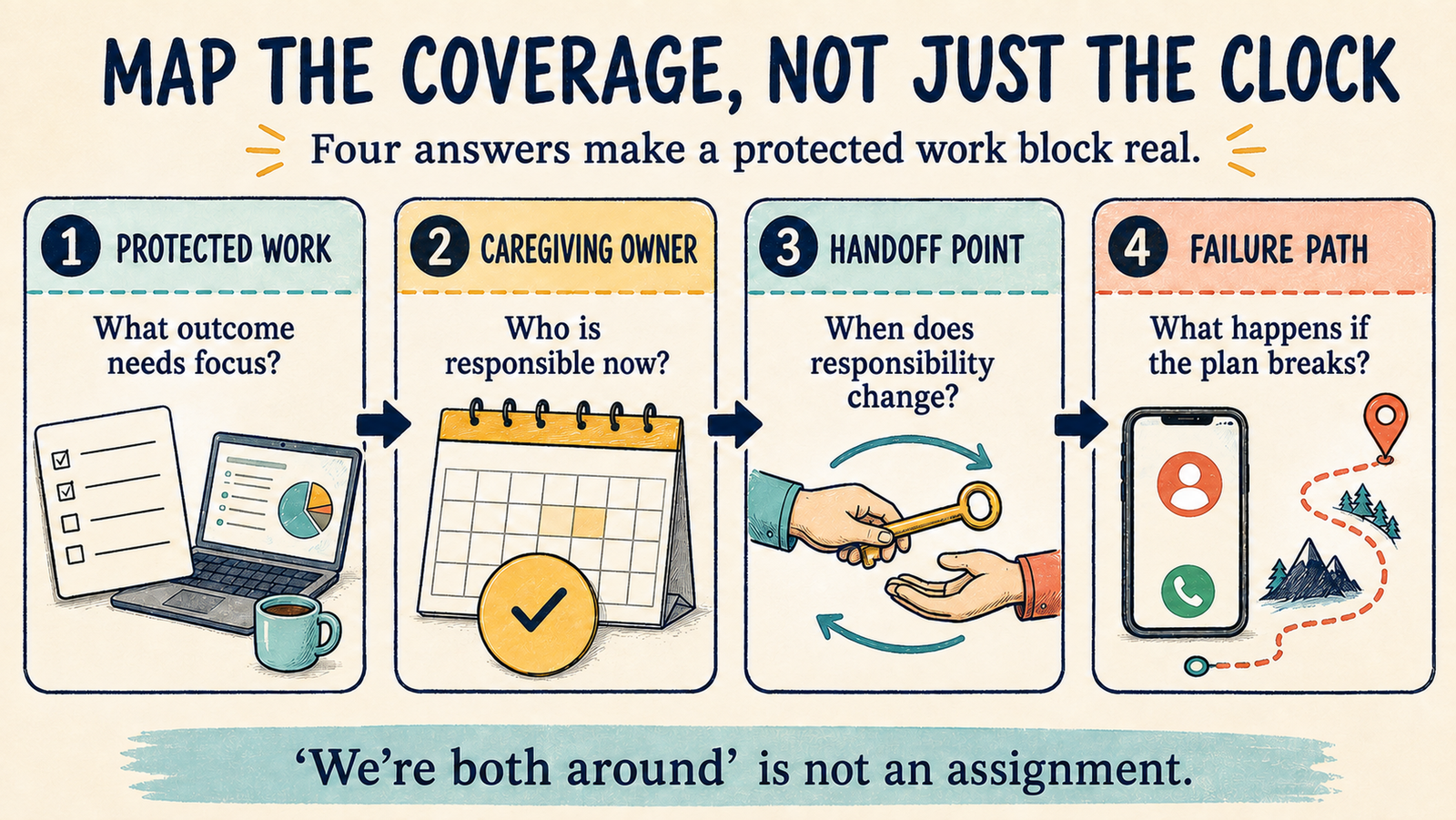
Build a weekly coverage map that shows who owns childcare, when work is protected, and where responsibility changes hands.
A clock-based schedule can look excellent while hiding the question that causes most trouble: who is responsible for the child right now?
A family operating system makes that answer visible before a call, deadline, or school pickup exposes the gap.
How to do it: Map four things for each important work period.
- Protected work. Name the block, the person working, and the outcome that makes the block worth protecting.
- Caregiving owner. Write down the adult who is actively responsible for the kids; ‘we’re both around’ is not an assignment.
- Handoff point. Agree on when responsibility changes, what information needs to be passed on, and who confirms the handoff.
- Failure path. Decide what happens if daycare closes, a meeting runs long, or the assigned caregiver becomes unavailable.
Example: You have a client presentation at 10 AM. Your partner owns childcare from 9:30 to 11:00, you confirm the handoff before closing the office door, and your sister is the agreed backup if daycare calls. The calendar shows the meeting; the operating system shows how the family makes the meeting possible.
Measure the System by Outcomes, Not Visible Busyness
A flexible family setup makes hours at the desk a poor measure of success.
Choose one or two meaningful work outcomes for the day, review progress across the week, and discuss deliverables with your manager instead of trying to look continuously available.
The household needs outcomes too. A good week is one in which important work moved forward, childcare responsibilities were clear, both adults had some protected time, and recurring breakdowns were noticed early enough to fix.
Example: A Tuesday with a sick-kid pickup can still be successful if you completed the essential deliverable, communicated the availability change, and nobody had to guess who was taking over childcare.
Part 2: Build a Flexibility Reserve Before You Need One
Build a flexibility reserve into every workday, not just the days that already look chaotic.
Kids don’t check your calendar before they get sick, teethe, or decide the couch is now a trampoline. A flexibility reserve is what keeps one bad interruption from wrecking your entire day.
The research backs this up.
A peer-reviewed study of 391 dual-earner couples found that family interruptions during remote work were associated with lower work engagement and greater hindrance stress — the frustrating kind that makes it harder to get things done.
That stress was also linked to greater family overload reported by spouses. The researchers found that breaks used for both self-care and non-work goals could help buffer some of these effects.
The researchers collected the data in the United States during the early months of the COVID-19 pandemic, so the findings may not represent every remote-working household today. Baylor University provides a more accessible summary of the research here.
In plain English, a bad interruption-heavy day at your desk doesn’t stay at your desk. It follows you into dinner.
A flexibility reserve has three parts.
- Schedule buffer. Leave 15 to 30 minutes unscheduled around your most important blocks. An interruption can still ruin the block itself — you can’t prevent that part — but the open time absorbs the spillover, so one ruined block doesn’t take whatever’s scheduled next down with it.
- Backup work plan. Keep a short list of low-focus tasks, like easy emails, filing, or admin, ready to go for moments when deep work simply isn’t possible.
- Emotional recovery capacity. Build in a few minutes after a stressful interruption to reset before diving back into work. One slow breath and a sip of coffee count.
Example: Say your 10 AM deep-work block gets hijacked by a diaper blowout.
With a flexibility reserve, you have 20 minutes of buffer to handle it, a backup task (clearing your inbox) ready for when you sit back down, and no need to spend the next hour silently fuming about your ruined morning. Without one, that diaper blowout costs you the whole morning.
Build a Backup Childcare Plan That Actually Works
A flexibility reserve absorbs small hits. A backup childcare plan is what saves you when the hit is bigger — a sick kid, a canceled daycare day, a sitter who no-shows.
When you do need to use it, a short heads-up to your manager covers most of what’s required: what happened, what you’re doing about it, and when you’ll be back online.
- Stack your options. A family member, a trusted neighbor, a backup sitter from an app or agency, and, if your employer allows it, a flexible or backup-care benefit.
- Test the plan once before you need it. A backup sitter who’s never met your kid is a much bigger ask during an actual emergency.
Part 3: Handle Interruptions With a Three-Level Plan
Managing interruptions while working from home starts with sorting them into levels, then matching your response to the level instead of reacting to everything the same way.
Not every interruption deserves the same reaction. Treating a five-second question like a five-alarm emergency burns energy you need for real work. Treating a real emergency like a minor annoyance burns trust with your family.
Use this framework to run on autopilot:
| Interruption Level | What It Looks Like | Your Response |
|---|---|---|
| Minor | A quick question, a knock, a “look at this!” | Answer briefly and return straight to your task. |
| Moderate | A cranky kid, a sibling squabble, a small mess, your Internet blinking out for a minute | Switch to a smaller task on your backup list until things settle. |
| Major | An injury, a sick kid, a childcare no-show | Pause the work block. Activate your backup childcare plan or reschedule the block entirely. |
Example: Your daughter wants to show you a drawing (minor). You glance, praise the artwork, and get straight back to typing.
Your son and daughter start bickering over the last snack (moderate). You step in for two minutes, then knock out some easy emails instead of forcing your way back into deep work.
Your backup sitter texts twenty minutes before she’s due to say she can’t make it (major). You pause the block, activate the backup plan from Part 2, and send your manager the “unexpected childcare problem” script from Part 5 instead of quietly going dark.
Set Age-Appropriate Boundaries with Your Kids
Work-from-home boundaries with children only work when they match how your kid actually understands the world, not what worked for your coworker’s teenager.
A boundary that works beautifully with a ten-year-old will not impress a toddler.
Toddlers are famously unmoved by calendar invitations, closed doors, or the concept of “just five more minutes.” (For the full breakdown of how this shifts by age — from newborn naps through teenage independence — see the age-by-age section How Do Time Pockets Change as Children Grow? in the post 10 Smart Time Pockets for Working From Home With Kids).
How to do it: A visible signal is a communication tool, not a supervision plan. A toddler or a baby can’t reliably read a sign, respect a closed door, or self-monitor on their own.
Any time you’re behind that door, an adult — a partner, a caregiver, or your backup childcare plan — needs to stay within arm’s reach of a child that age. The sign tells your family you’re focused.
If you use noise-canceling headphones during a work block, remember that they also cancel out the sound of a child in distress. Use them only when another adult is actively supervising your child.
Example: Instead of yelling “I’m working!” through a closed door, flip a laminated sign from green to red before your call starts. Your school-age kid learns to check the sign before knocking, and you stop getting interrupted mid-sentence on client calls.
Part 4: Run a 15-Minute Weekly Partner Reset
Not mandatory, but beneficial: Sit down with your partner once a week for 15 minutes and map out the week together.
A shared family calendar for working parents is more than a scheduling tool. It’s where you catch problems before they become fights, and where “who’s watching the kids Thursday afternoon” turns into a plan instead of a last-minute argument at 8:45 AM.
This is also where mental load stops being invisible. Keeping your partner “happy” isn’t really the goal here. Sharing ownership of childcare, the household, rest, and both of your careers is.
How to do it: Cover six things every reset:
- Meetings. Flag anything immovable, like client calls, interviews, or presentations, so you both know when “do not disturb” really means it.
- Deadlines. Name the days one of you is under real pressure, so the other can take on more caregiving load without you having to ask.
- Childcare. Confirm who’s covering which blocks, and line up backup care before you need it, not after.
- Personal time. Actually schedule it. Time that isn’t explicitly protected quietly disappears every single week.
- Family time. Block at least one shared activity, even a short one, so connection doesn’t get squeezed out by logistics.
- Likely problem periods. Flag any deadline or commitment you already know is coming, and plan the week’s coverage around it. You can’t know in advance whether your kid will get sick or whether you’ll sleep badly this week — but you can keep the flexibility reserve from Part 2 in place so a bad stretch doesn’t blindside you when it happens.
Example: Sunday night, 15 minutes, coffee in hand. You flag Wednesday’s big client pitch; she flags Thursday’s deadline. You agree she gets quiet mornings Wednesday, you get them Thursday, and you both block Friday afternoon for family time, no negotiations.
When Both Parents Work from Home
Two adults working from home under one roof sounds like double the flexibility. In practice, it’s double the video calls and one shared Internet connection. A few adjustments help.
- Stagger your focus blocks instead of both blocking 9 to 11 AM, so one of you is always reachable for the kids.
- Agree on a simple signal that means “this call allows zero interruptions” and overrides the other person’s default availability.
- Split the school run, pickups, and midday check-ins by day of the week, not by who happens to be free in the moment.
- Use separate rooms or clear zones if your space allows it, so two calls at once don’t turn into an audio mess on top of everything else.
Part 5: Talk to Your Manager About Flexibility Before a Crisis Forces the Conversation
Set expectations with your manager or clients about your real flexibility needs, before a childcare crisis forces the conversation for you.
You’re not alone in wanting this arrangement to work.
A June 2026 King’s College London study found that working fathers want roughly twice as many remote days as their employers currently allow, and 17% said they’d consider leaving their job if forced back to the office full time.
Many dads also worry that asking for flexibility openly will read as a lack of commitment.
Silence makes people assume the worst about your availability. A short, proactive message builds trust. A surprise explanation after a missed deadline erodes it.
How to do it: Have the flexibility conversation directly, ideally before you need it, not mid-crisis.
- Ask your manager what your company’s actual remote-work and flexibility policy allows, rather than guessing at the unwritten rules.
- Propose the specific arrangement you want, like fixed focus hours, occasional midday breaks, or an agreed response-time window, instead of a vague request for “more flexibility.”
- Offer a way to measure your output, so the conversation is about results, not hours online. (The section “Measure the System by Outcomes, Not Visible Busyness” above gives you a starting point.)
Part 6: Shut Down Work, Reconnect With Your Family, and Protect Your Own Wellbeing
End every workday with a deliberate shutdown ritual, not a slow fade from “working” into “half-working while half-parenting.”
Baylor’s research on remote workers found that planned breaks tied to real needs improve how people experience work stress, while pushing through fatigue without a real stopping point tends to make things worse. A clean ending to your workday isn’t a luxury. It’s what makes tomorrow’s focus block possible.
How to do it: Try this three-step shutdown ritual:
- Record your next action. On your favorite task manager app, write down the very next step for tomorrow’s top priority, so your brain can let go of it tonight.
- Close the laptop. Physically. Treat this as your default end time, not an unbreakable rule. An occasional real fire might add more minutes, but keep that the exception, not the routine.
- Reconnect on purpose. Walk into the next room and give your family your full attention for the first five minutes, not a distracted half-version of it.
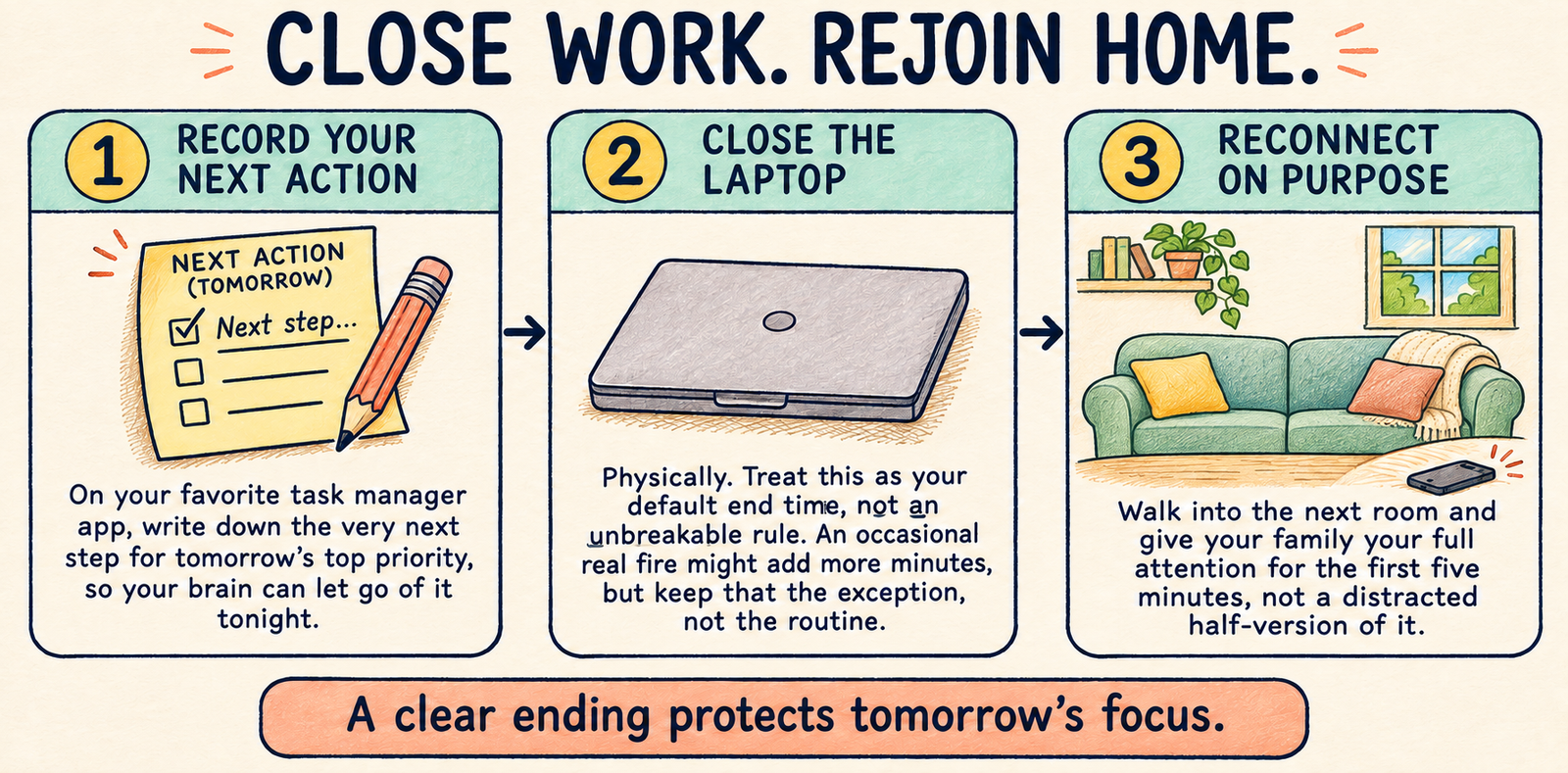
Example: At 4:00, jot “draft reply to Klein proposal” on your task list, shut the laptop, and walk straight into a five-minute dance party in the living room with your kids before dinner. No half-checking your phone. No “just one more email.”
Don’t Let Isolation Sneak Up on You
Working from home with kids can be strangely lonely — even on days packed with Teams calls, or with a partner, sitter, or daycare provider handling childcare right alongside you.
Meetings cover deadlines and status updates; a quick handoff with your co-parent covers who’s got the kids next.
Neither is the kind of conversation that actually makes you feel connected to another adult. Casual, non-work, non-parenting adult contact can quietly disappear from your week even when your days are full of other people.
- Schedule at least one real adult conversation a week that has nothing to do with work or parenting logistics.
- Take actual lunch breaks away from your desk sometimes; even a walk around the block counts.
- Notice if the time you used to spend commuting or chatting with coworkers hasn’t been replaced with anything — including friend time — and treat that gap as worth filling deliberately, not something that fixes itself.
- Say it out loud to your partner or a friend if the isolation is getting to you. It’s a common part of this arrangement, not a personal failing.
Keep the Family Operating System Visible
The best tools are the ones that make household agreements visible. You do not need a miniature mission-control center in the kitchen.
- Use one shared family calendar for meetings, caregiving shifts, school events, personal time, and likely pressure points. The value is not the app; it is that both adults are looking at the same version of the week.
- Use one simple availability signal at the office door, such as a reversible sign or colored light. Pair it with active supervision and agreed interruption rules, especially with young children.
- Keep the backup-care contacts somewhere your partner or sitter can find them without you — and keep your own message templates and shutdown notes somewhere you can grab them fast, so a real disruption doesn’t also turn into you scrambling to remember the right words. A system that exists only in Dad’s head is not yet a family system.
Five Mistakes That Break the Family Operating System
Watch for these five ways the system typically breaks down:
- Leaving childcare ownership vague. If both adults assume the other person is available, the first interruption becomes an argument instead of a handoff.
- Treating flexibility as Dad quietly absorbing every problem. Sustainable flexibility is discussed, shared, and visible; silent overextension is simply burnout wearing comfortable trousers.
- Keeping the plan in one person’s head. Calendars, backup contacts, and interruption rules need to be accessible to the household, not stored in a private collection of heroic mental notes.
- Going quiet at work when childcare changes. A short message with a timeline protects trust better than disappearing and explaining later.
- Skipping the weekly reset because the week is busy. Busy weeks are precisely when unclear handoffs, unequal personal time, and invisible deadlines do the most damage.
Work-from-Home Dad Productivity: Frequently Asked Questions
- Can I work from home full-time without childcare? For most jobs, not reliably. Remote work removes the commute, not a young child’s need for active supervision. Start by identifying the hours that require real coverage rather than treating childcare as a productivity problem.
- How might a single dad adapt this operating system? The same planning questions still apply, but coverage may need to come from paid childcare, trusted family, reciprocal arrangements, community support, or workplace flexibility. Because I have not parented solo, treat this as a planning framework rather than firsthand advice.
- What should I do when childcare falls through? Activate the failure path you planned: contact the backup caregiver, tell your manager or client what changed, provide a realistic update time, and renegotiate the day’s outcomes.
- How do I know whether the system is working? Look beyond hours logged. The signs are clearer ownership, fewer last-minute negotiations, reliable communication at work, more equitable protected time, and fewer evenings spent recovering from preventable chaos.
Put Your Family Operating System into Practice
Working from home with kids was never about creating a distraction-free office. It is about making ownership, expectations, and backup plans clear enough that work and family life can share the same day without constantly surprising each other.
Try This Week
Write down next week’s protected work blocks. For any of them that daycare, school, or your regular routine doesn’t already cover, assign who’s responsible — a partner, a sitter, or you with backup ready — and note the handoff points and backup plan for those specific gaps.
Before You Go: Fix the Space You’re Working In Too
A flexibility reserve and a weekly reset handle the scheduling side. A workspace that fights you burns through the time you just protected — a chair that hurts your back, a desk buried in cables, no clear signal to your kids that you’re mid-focus. My free Home Office Setup Checklist covers all of that in one printable, 27-point pass.

Written by Timo
who’s spent years working from home and hybrid — rebuilding this same setup more than once as work and family life changed. Smart Remote Work is where that experience turns into checklists, tools, and systems for people doing the same.