

10 Smart Time Pockets for Working from Home with Kids
Editorial note: This article is an updated version of an article I originally wrote and published on my earlier blog, Productive Superdad, which no longer exists. I used AI to help restructure, rewrite, and expand it for Smart Remote Work, which I’m restarting after stepping away from blogging for a few years. The underlying ideas, experiences, and perspective are my own, and I reviewed and edited the final article before publication.
I wrote the first version of this article in 2012, when my son was one. He’s almost 15 now, and the tools have changed (RIP, MP3 player), but the core problem hasn’t moved an inch. I’ve kept adapting this method as his routines, independence, and need for supervision have changed.
Back then, I was unemployed, and time pockets were how I built something out of nothing. These days most of mine go to a full-time day job, with what’s left over going toward this blog on the side — yours will go somewhere else entirely, and that’s the whole point.
Working from home with kids is flexible in roughly the same way a family holiday is relaxing: technically true, but the details involve snacks, missing shoes, and someone urgently needing cardboard.
In a 2026 survey of 2,242 U.S. working parents, Pew Research Center found that 59% of parents working full time handle work-related tasks while spending time with their children. Among full-time working parents who aren’t self-employed, only 24% reported having a lot of flexibility to work remotely.
In other words, you’re not doing it wrong. The day just doesn’t arrive in neat blocks.
Here’s the promise of this guide: instead of waiting for an imaginary perfect afternoon, use small “time pockets.” Notice the openings already built into family life, match each opening to the right task, and protect the time that should stay family time. That’s how to find time to work from home with kids, whether you’re doing this with a partner, solo, or without any nearby support.
The Eight Time Pockets at a Glance
A time pocket is a short, usable opening in your day that you can match to a task requiring roughly the same amount of time, energy, and concentration. Consider these examples as your typical time pockets:
- Early mornings before the household wakes up.
- Naps or quiet-time periods.
- School hours or independent-play blocks.
- Protected time agreed on with a partner.
- Occasional childcare or a scheduled support swap.
- Unexpected openings, such as a cancelled meeting.
- Waiting or travel time.
- Selected evenings, weekends, or vacation periods.
Quick Answer: How Can You Work from Home with Kids?
- Identify your recurring quiet periods first. Notice when the house goes quiet before you try to schedule around it.
- Match short openings to small tasks, and save your longest, most protected blocks for work that needs real concentration.
- Adjust the method as your kids age. A time pocket that works for a toddler looks nothing like one that works for a teenager.
- Protect time out loud. Agree on it with your partner, or build backup support if you’re parenting solo or without nearby family.
- Prepare a short list of tasks you can start instantly, plus a backup plan for the days childcare falls through.
Remember: Rest Is Part of the Plan
Leave some openings empty on purpose. The goal isn’t to fill every free minute with work.
How Do You Find Time to Work From Home With Kids?
Before you build a new schedule, observe the one your household already runs. Bedtimes, school runs, naps, activities, and family commitments create patterns—even when those patterns feel slightly allergic to consistency.
For a few days, note when work is realistically possible, when another adult is available, and when your own energy is highest. Record what actually happens, not the ideal version of the day.
Look for openings that occur more than once. Those repeats are your most promising time pockets. Choose one and match it to a task that fits its length, your energy, and your child’s supervision needs.
Early mornings deserve a special mention. Their real value isn’t simply extra time; it’s the possibility of fewer interruptions before the household wakes up.
Choose your first task the night before, or a 20-minute session can evaporate before your coffee has had a chance to become emotionally supportive.
One caution worth repeating: don’t manufacture productivity by routinely sacrificing sleep. After a rough night, rest may be the most useful thing you can do for tomorrow’s work.
What This Method Assumes about Childcare
Remote work and childcare rarely divide into neat categories, which is exactly why this method needs one honest caveat.
Time pockets work when a child can be safely independent, even briefly — a napping baby, a toddler with five minutes of solo play, or a teenager who doesn’t need supervision at all.
If your child needs constant hands-on care with no real breaks, most of this becomes background planning for the moments that do open up. The sections on protecting time without nearby support and building a childcare-failure plan later in this guide matter more for you than the deep-work sections do, so feel free to jump ahead.
When my son was a baby, I tracked his sleep patterns just to find the predictable openings. I wasn’t trying to turn parenthood into an Excel workbook, although there were moments a pivot table felt tempting.
What Does a Realistic Work-From-Home Schedule With Kids Look Like?
A work-from-home schedule with kids doesn’t have to look like a corporate calendar with the meetings swapped out. Abstract advice is easy to nod along to and hard to use, so here’s an example of what a day could look like once you’ve mapped your own openings.
| Time | Time Pocket | What Fits Here |
|---|---|---|
| 6:00 AM | Get the engine running… | Getting up, drinking some water, brushing your teeth |
| 6:15 AM – 7:15 AM | Before the house wakes up | Deep-focus writing or planning |
| 7:30 AM – 8:15 AM | Breakfast and drop-off | Protected family time, no work |
| 9:00 AM – 12:30 PM | School hours or another caregiver’s coverage. | Calls, meetings, focused work |
| 12:30 PM – 1:00 PM | Lunch | An actual break, no work |
| 1:00 PM – 3:00 PM | School hours or another caregiver’s coverage. | Your longest deep-work block |
| 3:30 PM – 4:00 PM | After-school pickup gap | One quick decision or message |
| 8:00 PM – 8:30 PM | After bedtime | Wrap up, and set tomorrow’s first task |
Your version will look different, and it should. The point isn’t to copy these exact hours; it’s to see how short, specific pockets stack into a working day without needing eight uninterrupted hours anywhere in sight.
It’s also worth noting the shape changes with your child’s age — younger kids fragment the day more, teenagers less. In my case, there’s no school run to plan around at all, since here in Finland kids mostly handle that on their own (more on how this shifts by age below).
How Should You Match Tasks to the Time You Have?
Good time management for working parents isn’t about finding more hours. It’s about matching the task to the moment you actually have. Not every quiet moment deserves the same kind of work.
When my son was younger, his naps created reliable openings, especially on weekends and vacations. I’d sometimes take a short power nap myself, then work with noticeably better focus afterward.
The principle isn’t “work whenever your child sleeps.” It’s to reserve your lowest-interruption periods for tasks that actually benefit from deeper thinking. Writing, analysis, planning, and creative work belong in the strong pockets.
Processing your inbox generally doesn’t belong there. Email will happily consume any amount of time you offer it.
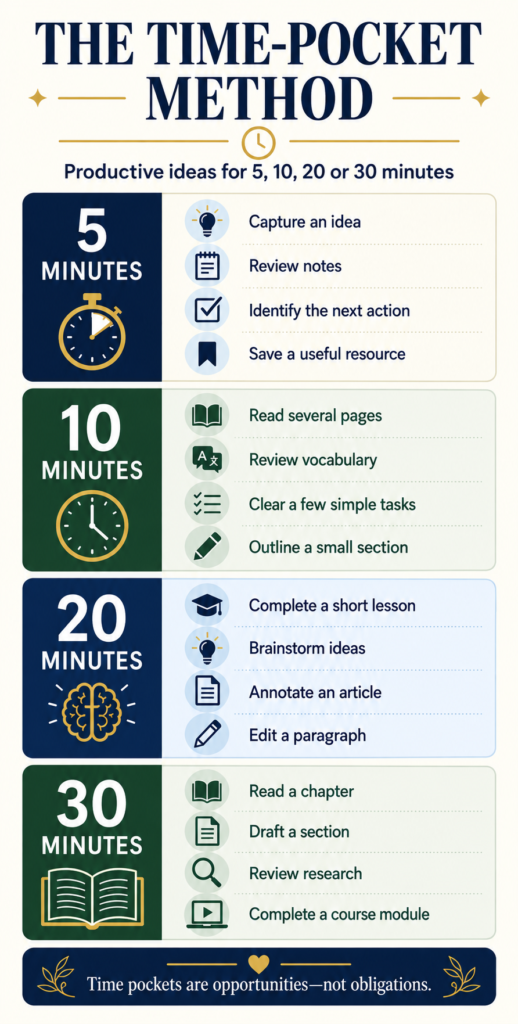
| Time Available | Good Tasks |
|---|---|
| 5 to 15 minutes | Capture ideas, check priorities, read notes or answer one short message. |
| 15 to 45 minutes | Outline, edit, research, plan or handle a defined admin task. |
| 45+ minutes | Write, create, strategize or tackle an important deep-work project. |
These categories aren’t laws. They’re a starting point for making full use of a pocket when your energy is high enough to match it.
How Do Time Pockets Change as Children Grow?
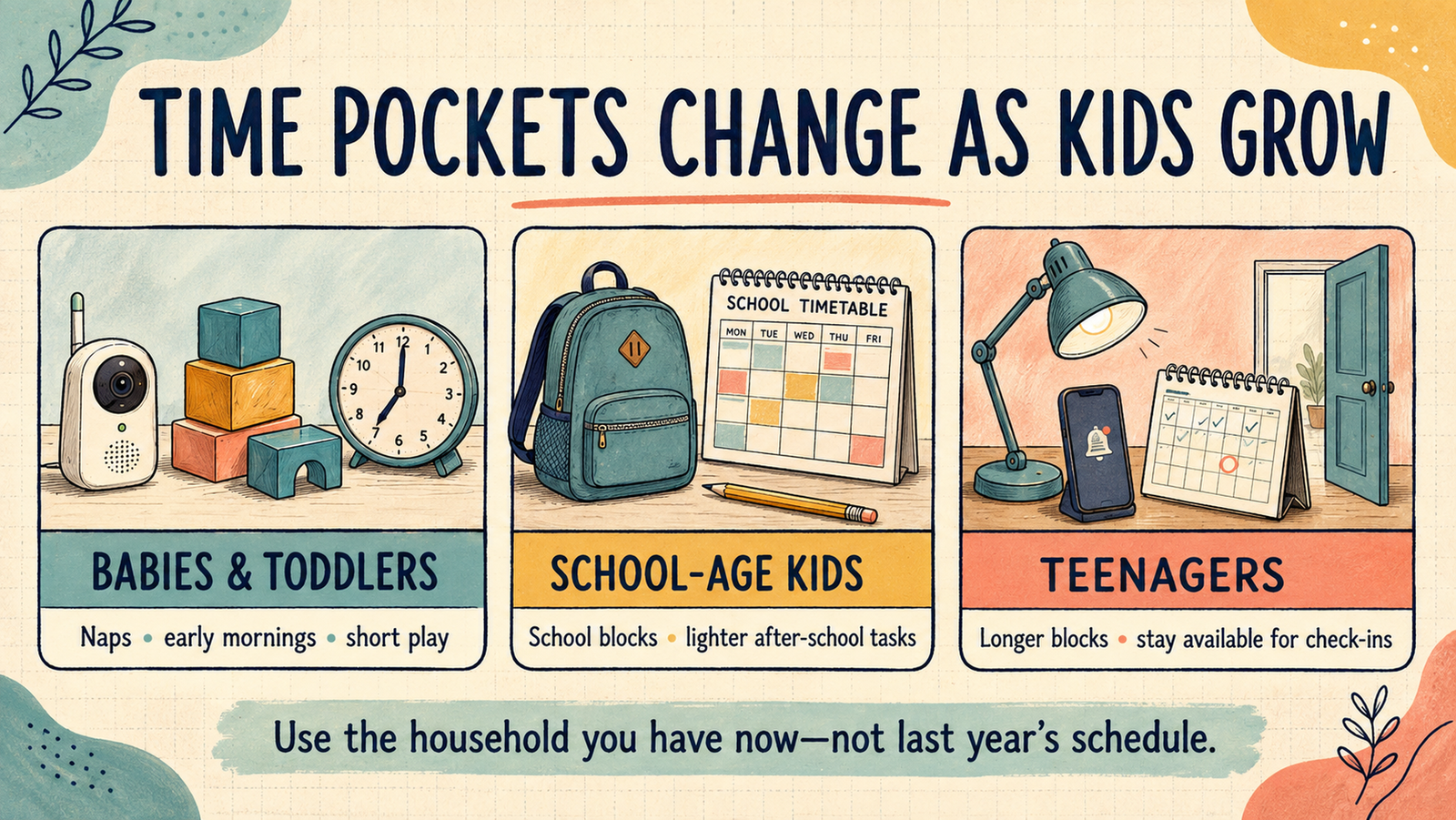
The time-pocket method holds up over the years, but what counts as a usable pocket changes completely as your kids grow. A strategy built for a toddler will frustrate you with a ten-year-old, and a strategy built for a ten-year-old will bore a teenager.
Babies and toddlers. Working from home with a toddler means working around naps, feeds, and short bursts of independent play, since that’s where this method started for me. Early mornings work well here too, before the rest of the house wakes up. Expect shorter pockets and more unpredictability; a toddler doesn’t care that you finally found 20 minutes.
School-age kids. Once kids are in school, the shape of the day changes. You gain longer, more predictable blocks during school hours, but you also pick up new interruption points around drop-off, pickup, homework, and after-school activities. After-school hours tend to suit lighter tasks (email, admin, planning tomorrow) better than deep work, since kids this age often want company nearby even while playing independently.
Teenagers. Teens generally need far less hands-on supervision, which sounds like a productivity win, and often is. The trade-off is unpredictability of a different kind: a teenager’s need for you tends to show up in short, emotionally important bursts, often right when you didn’t schedule for it. Stay alert to the moments worth interrupting yourself for, even once the daily supervision load has mostly disappeared.
Whatever stage you’re in, the underlying skill stays the same: notice what’s actually happening in your house right now, not what worked last year.
How Can You Protect Work Time Without Guilt?
Your time is connected to everyone else’s when you have a family. One of the most useful productivity tools is not an app. It’s a conversation, said out loud, before the time is needed.
If I needed an evening for a fixed commitment, I agreed on it with my wife beforehand and put it on our family calendar. That made the work period visible instead of letting it appear out of nowhere at 7:58 PM.
Protected time works best when both adults receive it equally. Take responsibility for the kids while your partner does something that matters to them, then agree on a period when you can concentrate too. It keeps things fair, and it prevents the quieter resentment that builds from questions like “Why is it always you who gets time off from the kids, and not me?”
Make Your Closed-Door Signal Actually Work
A closed door works best when everyone knows what it means. With babies and young children, use this arrangement only when another responsible adult is looking after them.
Whatever your child’s age, make it clear that they can interrupt if they’re hurt, frightened, need help, or aren’t sure whether something can wait. A closed door means “I’m trying to focus,” not “you’re on your own”.
For older children who can safely spend time independently, agree on a short focus period and when you’ll be available again. A colored sign can make the arrangement easier to understand—but it isn’t a magical force field.
If you’re the only adult supervising a young child, choose work you can pause and remain available to them. Save closed-door focus sessions for when you have childcare coverage.
If You’re Parenting Solo or without Nearby Support
The parent-to-parent trade described earlier assumes a co-parent to trade with, and plenty of households don’t have one, whether that’s because you’re parenting solo or because you simply don’t have family nearby.
The underlying principle still applies: protected time needs to be visible and supported by somebody, even if that somebody isn’t a partner.
That might mean a scheduled childcare swap with another parent, a regular sitter for one predictable block a week, or a community or co-working space that offers supervised play. The goal is the same either way: turn your protected time from a hope into an appointment.
Some projects genuinely need a bigger, uninterrupted block: a launch, a recording, a hard deadline, or a major strategy task. That’s when a trusted sitter, family member, or paid childcare arrangement can make sense. Decide what you’ll finish before the block starts, or your expensive focus time may go toward reorganizing folders with unprecedented enthusiasm.
Weekends and vacations deserve the same protection in reverse. They sometimes hold useful pockets, but they aren’t blank space waiting to be filled with unfinished projects. Fit work around your life instead of forcing your life to fit around your work.
What Should You Do When Interruptions or Childcare Plans Derail Work?
Two different problems deserve two different plans: what you do the moment you get pulled out of a task, and what you do when your childcare arrangement collapses entirely.
The Interruption-Recovery Protocol
The interruption itself often costs less than the clumsy restart afterward. Three small habits reduce most of that recovery cost.
- Note your stopping point. One line about where you were and what’s next, written before you deal with the interruption, takes a few seconds and makes restarting easier.
- Handle the interruption completely. Answering it while half-thinking about your task usually means solving it twice.
- Use a 60-second re-entry step. Reread your one-line note, take a breath, and start the smallest next action instead of reviewing everything from the beginning.
Planned recovery time also matters more than people expect. Baylor University research on remote work found that breaks used for non-work needs or self-care were associated with healthier views of work stress. When a child needs you, fully handling that need can be more effective than trying to do half a job as both parent and employee.
Your Childcare-Failure Backup Plan
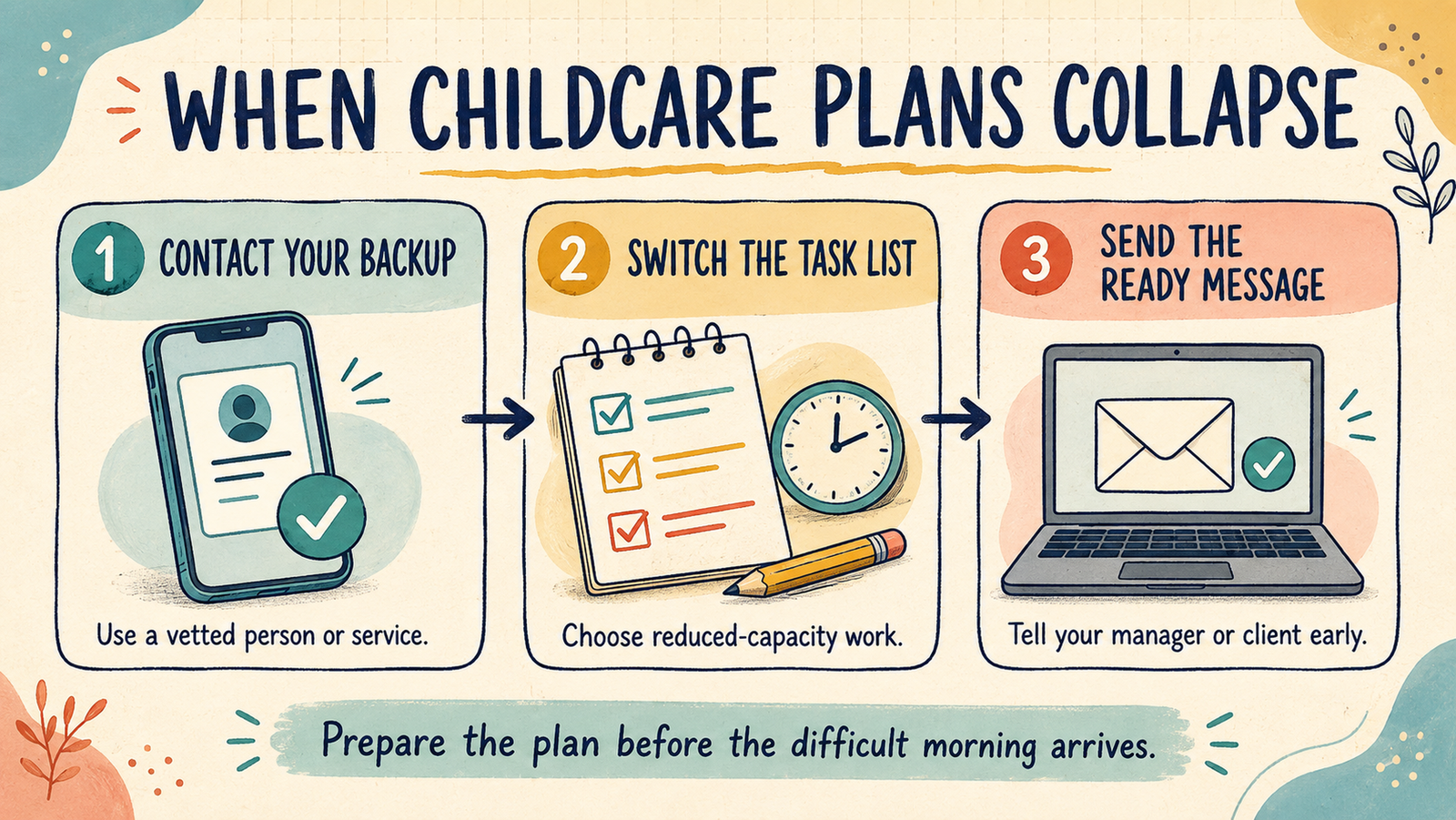
Plans fail. A sitter cancels, a daycare closes for the day, or a school calls at 10 AM. A backup plan built in advance turns a crisis into an inconvenience.
- Keep one backup contact already vetted, not when the crisis is on: a neighbor, relative, or on-call sitter service.
- Keep a short reduced-capacity task list for brief openings when your child is resting, and you can remain attentive to their needs.
- Keep a two-line message template ready for your manager or client, so you’re not drafting an apology from scratch while also managing a meltdown.
How Can You Use Unexpected Openings and Waiting Time?
An appointment ends early. A meeting gets cancelled. Someone takes the kids out for an hour.
Suddenly you have 30 minutes that weren’t on the schedule. Unexpected time disappears fast when you don’t know your next move.
Keep a short list of tasks you can start without setup: outline a section, review a document, answer one important message, or capture ideas for later. Preparation turns a surprise opening into progress; without it, you spend 18 minutes deciding what to do, followed by two heroic minutes of actual work.
The same logic applies to waiting and travel time. I used to travel with a Kindle and an MP3 player; today it’s more likely a phone loaded with a podcast app and downloaded files, but the principle hasn’t changed.
Download what you need, charge your devices, and choose your tasks before the journey starts. A two-hour train ride can become a genuinely good focus session.
Use short waits for genuinely mobile tasks: a supermarket checkout line is a reasonable place to record an idea. At the same time, a shaky Internet connection will quickly remind you it isn’t the place to write your masterpiece.
How Do You Protect Your Energy and Count Small Wins?
Staying productive while working from home with kids rarely looks like eight straight hours of flow. A 15-minute session can feel insignificant when the finished project is still far away, but if those 15 minutes clarify the next step, finish an outline, or remove a blocker, they count.
This matters more than it sounds. In the same Pew Research Center survey, 54% of full-time working parents said balancing work and family responsibilities was difficult. Protecting a little recovery time between pockets isn’t indulgent; it’s what keeps the whole system usable.
You don’t need every day to be spectacular. You need enough useful days, repeated consistently, to keep moving in the right direction. Little progress has a funny habit of becoming substantial progress.
Which Tools Reduce Time-Pocket Friction?
A few simple tools make time pockets easier to run, without turning this into a shopping list.
- A planner or shared calendar. Paper or digital works, as long as it’s the one you’ll actually check; visibility and quick updates matter more than features.
- A portable charger and offline files. If you use travel or waiting time regularly, these remove two common excuses before they develop personalities.
- AI planning tools, used carefully. Some working parents now use AI scheduling assistants to sketch out a week or sort a messy inbox in seconds. They’re genuinely useful for that, but they don’t replace the conversation with your partner about who’s covering what; that part stays human.
- Headphones and a simple timer. Comfortable headphones can signal that a focus period has started; a visible timer gives you a stopping point to commit to.
Safety Note for Parents
If you’re the only adult supervising a baby or young child, avoid headphones or noise cancellation that could prevent you from hearing them. Save noise-cancelling headphones for work sessions when another responsible adult is looking after the children.
Which Mistakes Make Working From Home With Kids Harder?
- Assuming one schedule will work forever. What counts as a good time pocket changes as your kids grow, so revisit your plan at least once a year.
- Ignoring paid or community childcare out of guilt. Needing support isn’t a productivity failure, and going without it when you don’t have to rarely helps anyone.
- Assigning deep work to a noisy, unpredictable pocket. Match the task to the time, environment, and energy you actually have, not the time you wish you had.
- Taking protected time without discussing it out loud. A schedule that quietly builds resentment at home isn’t productive in the long run.
- Skipping the interruption-recovery step. Diving straight back into a task without a re-entry moment usually costs more time than the interruption itself did.
- Having no childcare-failure plan until you need one. A backup contact and a message template take ten minutes to prepare and hours to improvise.
- Assuming a closed door is a self-explanatory signal. It only works once everyone has agreed on what it means and when it can be overridden.
- Buying a new tool before fixing the real constraint. A new planner won’t repair unclear priorities, missing childcare, or chronic sleep deprivation.
Working from Home with Kids: Frequently Asked Questions
How can I work from home with a baby or toddler? Lean on naps, feeds, and early mornings before the house wakes up, and expect shorter, less predictable pockets than you’ll get once your child is older.
How do single parents or households without nearby family find protected work time? Build support somewhere other than a co-parent: a childcare swap with another parent, a regular trusted sitter for one block a week, or a co-working space with supervised play.
What should I do when childcare unexpectedly falls through? Use your childcare-failure backup plan: contact your vetted backup, switch to your reduced-capacity task list, and send your prepared message to your manager or client right away.
How do I get back into focus after an interruption? Note your stopping point before you deal with the interruption, handle it fully, then use a short re-entry step, like rereading your note and taking one breath, before restarting.
Are 15-minute work sessions really worthwhile? Yes, when the task fits. Fifteen minutes is enough to capture an idea, outline a section, answer an important message, or make the decision that unlocks the next block of work.
Conclusion: Build Work around Real Life
Real work-life balance while working from home with kids was never about extracting productivity from every minute. It’s about noticing when meaningful work is realistically possible and using those windows on purpose.
Try This for Seven Days
For the next seven days, record your recurring time pockets, estimate their length, and assign one kind of task to each. Notice which time pocket turns out to be your best find, and how you spotted it.
Before You Go: Fix the Space You’re Working In Too
Time pockets help you find the minutes. A workspace that fights you burns through them fast — a chair that hurts your back, a desk buried in cables, no clear signal to your kids that you’re mid-focus. My free Home Office Setup Checklist covers all of that in one printable, 27-point pass.

Written by Timo
who’s spent years working from home and hybrid — rebuilding this same setup more than once as work and family life changed. Smart Remote Work is where that experience turns into checklists, tools, and systems for people doing the same.