
How to Use Small Pockets of Time Productively: The 5–30 Minute Method
Editorial note: This article is an updated version of an article I originally wrote and published on my earlier blog, Productive Superdad, which no longer exists. I used AI to help restructure, rewrite, and expand it for Smart Remote Work, which I’m restarting after stepping away from blogging for a few years. The underlying ideas, experiences, and perspective are my own, and I reviewed and edited the final article before publication.
Your day is not actually one long, unbroken stretch. It just feels that way when you’re trying to find “real” time to work on something that matters.
Look closer, and you’ll find ten minutes here, twenty minutes there — a waiting room, a slow queue, a meeting that mercifully ends early. Most of us let these small pockets of time evaporate, usually into our phones, because we never decided in advance what to do with them.
That’s the whole problem. It’s rarely a lack of time. It’s a lack of a plan for the time you already have.
This guide shows you how to use small pockets of time productively with the 5–30 Minute Method — sometimes called the time-pocket method: a simple, low-effort system for spotting these gaps, matching them to the right task, and letting go of the ones you leave empty. Think of it as micro-productivity for a life that rarely hands you a clean two-hour block.
Quick Answer: How to Use Small Pockets of Time Productively
- Notice your recurring gaps first. Waiting rooms, queues, school pickups, and short breaks between meetings are all small pockets of time.
- Match the task to your time, energy, and environment, not just the minutes on the clock.
- Keep a ready-made, low-friction task list, sorted by how long it takes: 5, 10, 20 or 30 minutes.
- Prepare your material offline in advance, so you spend the pocket working, not deciding.
- Leave yourself a one-line breadcrumb before you stop, so restarting doesn’t cost you extra focus.
- Know when to skip it. Some pockets are better spent resting, and that’s a valid choice too.
What Is a Time Pocket?
A time pocket is a short window between other activities that’s easy to miss. It shows up while you wait for an appointment, arrive early for a meeting, or sit outside your kid’s swimming lesson.
Time pockets matter because they’re everywhere, and most of us waste them by default, not on purpose. A few unclaimed minutes here and there add up to hours over a month.
Here’s how to spot one: it’s usually five to thirty minutes long, too short for deep work, but long enough for a small, specific task with almost no setup.
For example, the fifteen minutes before your dentist appointment isn’t “dead time.” It’s a time pocket that can hold one email, one page of reading, or one good idea captured before you forget it.
Find the Time Pockets Hiding in Your Day
Most of us plan around big blocks of time and ignore everything smaller than thirty minutes. That’s a mistake, because the small stuff is where a lot of your day actually lives.
Time pockets matter because they’re often more available than “real” free time. You may not have a spare two hours this week, but you almost certainly have six spare ten-minute windows.
Here’s how to find yours. For a few days, simply notice:
- Waiting for appointments or public transport.
- School pickups and kids’ activities.
- Queues, delays, and other people running late.
- Short gaps between back-to-back meetings.
- Early arrivals, lunch breaks, and walks.
- Any moment you automatically reach for your phone because there’s “nothing to do.”
Write down when these moments happen, how long they last, and what the environment is like. You’re not building a to-do list yet. You’re just mapping the terrain.
This is also how you learn how to use waiting time productively. Once you can see the pattern — the same ten-minute wait every Tuesday, the same twenty-minute pickup line — you can start preparing for it instead of improvising in the moment.
Match the Task to Your Time, Energy and Environment
An empty gap in your day is not automatically a usable time pocket. Filling every single one is how you turn a helpful method into a new source of stress.
This matters because time alone doesn’t tell you what to do with a pocket. A quiet ten minutes can support real reading. A noisy thirty minutes in a waiting room might only be good for listening to a podcast.
Here’s how to decide, fast, before you open anything:
- Do I have enough mental energy for this right now?
- Is the environment safe, quiet enough, and private enough?
- Can I stop instantly if the wait ends without warning?
- Would this activity genuinely make the time better?
- Would rest, people-watching or a conversation serve me more right now?
A usable time pocket needs all four ingredients: time, energy, environment and desire. Miss one, and it’s probably not the moment.
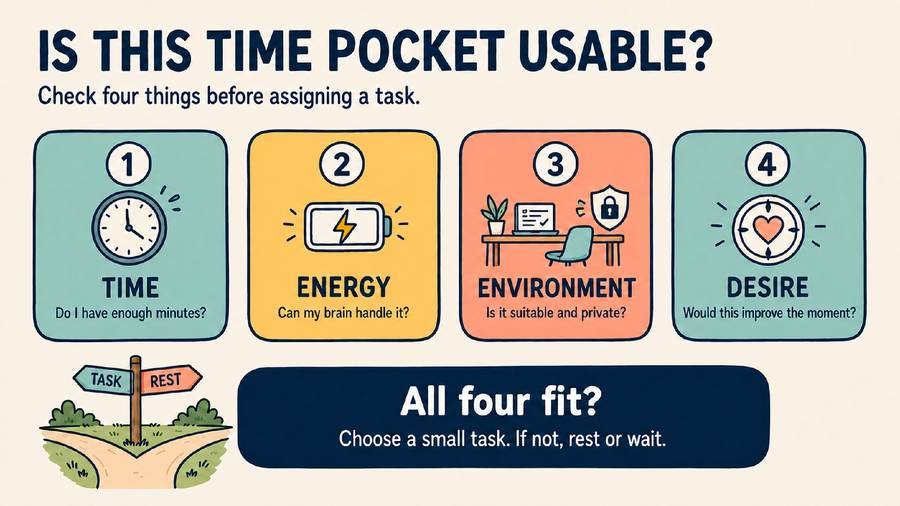
For example, a rattly ten-minute train platform wait with patchy Internet is a fine moment to capture an idea into your notes app. It’s a terrible moment to write the opening paragraph of a client proposal.
Know When Not to Use a Time Pocket
Sometimes the smartest move is to let a pocket pass completely untouched. This is not laziness. It’s the method working as intended.
This matters because the goal was never to optimize every waking minute. You are a person, not a productivity engine, and treating every gap as a task slot is a fast route to burnout.
Here’s how to recognize a “skip it” moment: you’re mentally tired, you need to process whatever just happened, you’re with another person who deserves your attention, or you simply want to notice the world around you for a minute.
Remember: Rest Is an Option
Not every gap needs a task. That’s the part most productivity advice skips, and it’s exactly why this method includes a genuine “do nothing” option.
For example, the five minutes after a hard conversation with a colleague isn’t a time pocket for answering emails. It’s a time pocket for taking a breath before you do anything else. Drink your coffee. Watch people walk by. Let your mind wander. That’s a legitimate use of the time, not a wasted one.
The 5-, 10-, 20- and 30-Minute Task Menu
Once you know a pocket is worth using, the next question is simple: what fits? The shorter and less predictable the pocket, the lower the task’s startup cost needs to be.
This matters because vague tasks kill short pockets before they start. “Work on the project” eats your whole ten minutes just deciding what “work on the project” even means today.
Here’s a ready-made menu of productive things to do in 5, 10, 20, and 30 minutes. It sorts short productive tasks by time and by what you can realistically do in that window:
| Time You Have | Productive Things to Do | Best Suited For |
|---|---|---|
| 5 minutes | Capture one idea, answer one short message, review five flashcards, skim one saved headline. | Any environment, even a queue or a hallway. |
| 10 minutes | Read a few pages, listen to part of a podcast, outline one paragraph, clear one small inbox task. | Quiet or moderately noisy settings. |
| 20 minutes | Read a full article, review and edit a short document, plan tomorrow’s top three tasks, do a language lesson. | Reasonably quiet, low-interruption settings. |
| 30 minutes | Draft a short section, do focused reading with notes, work through one lesson or module, plan a full week. | A quiet, private setting with a real stopping point. |
Here’s what a low-friction task list looks like in practice. Sort every task into one of four buckets, and be specific:
- Read: A saved article, a newsletter, three pages of a book, or a report you’ve been avoiding.
- Listen: A podcast episode, an audiobook chapter, or a language lesson.
- Capture: An idea, a question, a task, or a line for something you’re writing.
- Create: One paragraph, one outline, one small edit, or one project plan.
For example, instead of “work on course,” write “watch lesson 3.” Instead of “read book,” write “read chapter 4, pages 40 to 55.” The more specific the task, the less of your pocket it eats just getting started.
Still not sure what to do with 20 minutes or a random half hour? Pull one item straight from your Read, Listen, Capture, or Create list, and treat it as your default answer until something better comes along.
Protect Your Privacy When You Work in Public
Not every time pocket happens somewhere private, and that changes what belongs on your task list. A packed train or a coffee shop is not the place for everything on your menu.
This matters more than it sounds. In one Forbes Advisor survey, 40% of travelers reported a security compromise while using public Wi-Fi, and a quarter admitted to checking financial accounts over public networks anyway.
Here’s a quick checklist before you open anything sensitive in public:
- Skip financial logins, client data, and confidential documents on public Wi-Fi. Use your phone’s hotspot instead if you truly need one.
- Use a privacy screen filter if you regularly work on sensitive material on trains or in cafes.
- Sit with your back to a wall when possible, so your screen isn’t a free show for the person behind you.
- Keep your device locked and in sight, even for a quick bathroom trip.
- Save calls that involve names, numbers, or client details for a private space, not a shared table.
For example, a public-space time pocket is a great moment to read, listen, or capture ideas. It’s a poor moment to log into your bank account or review a colleague’s salary details on a shared screen.
Prepare in Advance so the Pocket Doesn’t Go to Waste
The method breaks down fast if your headphones are dead, your book is still on your nightstand, or you spend the whole pocket deciding what to do. Preparation is what makes the other steps actually work.
This matters because a time pocket is short by definition. Every minute spent hunting for material or charging a device is a minute you don’t get back.
Here’s a short pre-flight check to run before a pocket appears:
- Are your devices and headphones charged?
- Is your book, article, lesson, or audio already downloaded?
- Can you access what you need without the Internet?
- Are your notes and documents synced across devices?
- Is your task list somewhere you’ll actually remember to check?
- Have you already defined the next small action?
For example, a simple Sunday-night routine, like downloading three podcast episodes and syncing your reading app, can quietly hand you five useful pockets before Wednesday even starts.
Make It Easy to Stop and Resume
Time pockets rarely end on your terms. The receptionist calls your name, the queue moves, or the next meeting starts right on top of the last one.
This matters more than most people realize. Research from Dr. Gloria Mark at UC Irvine found that it takes an average of 23 minutes and 15 seconds to return to a task after an interruption. A messy stop makes that worse; a clean one makes it nearly disappear.
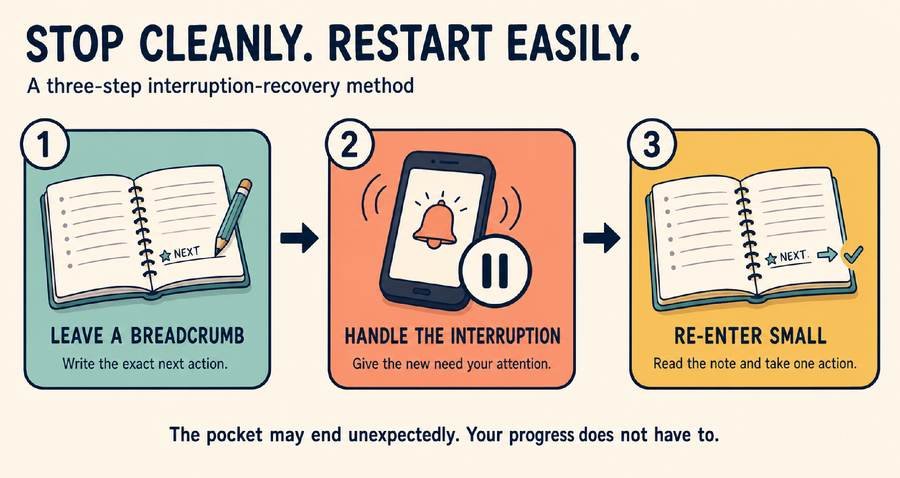
Here’s how to leave yourself a breadcrumb before you go:
- Write one sentence describing the next action.
- Highlight the next paragraph or page.
- Note the timestamp in an audio lesson or podcast.
- Save your notes in the same place every time.
- Leave the document open exactly where you left off.
For example, instead of closing a document mid-thought, type one line first: “Next: finish the second bullet point, then send to Sam.” Future-you, mid-queue with three seconds to spare, will be quietly grateful.
Tools and Products Worth Packing in Your Time-Pocket Kit
Choose the task first, then choose the smallest tool that supports it. A time-pocket kit isn’t about carrying every gadget you own, no matter how satisfying that packing list looks on paper.
This matters because a bag full of chargers and devices adds friction before you’ve even started, which defeats the entire point of a low-friction task.
Here’s what tends to earn a permanent spot in mine:
- A smartphone for listening, reading saved material, and capturing ideas fast.
- An e-reader for a genuinely focused reading experience without notification pop-ups.
- Comfortable noise-isolating headphones or earbuds for podcasts, audiobooks, and language lessons.
- A small notebook and pen for fast, distraction-free capture and outlining.
- A compact portable charger, so a dead battery never cancels a good pocket.
In practice, that’s a menu, not a packing list — most days I’m grabbing just one or two of these on my way out the door, matched to whatever pocket I’m expecting. (I have occasionally thrown the whole kit in a bag, but that’s the exception, not the habit.)
A laptop usually isn’t worth the weight for a short, unpredictable wait. Save it for pockets you can reasonably expect to run twenty minutes or longer.
And don’t underestimate a plain paper book. It needs no Internet connection, battery, or charger, which makes it one of the most reliable tools in the whole kit.
Common Time-Pocket Mistakes to Avoid
- Trying to make every minute productive. Decide which pockets you’ll use, and deliberately leave others empty.
- Carrying too much gear. A laptop, tablet, e-reader, notebook, and three chargers stop feeling lightweight fast, and start feeling like a mobile electronics store.
- Choosing the wrong kind of work for the setting. A noisy ten-minute wait isn’t the place to solve your hardest problem.
- Relying on an Internet connection you might not have. Keep key material available offline.
- Opening your phone with no plan. “I’ll just check one thing” is how twenty minutes vanish into an app you didn’t mean to open.
- Skipping the privacy check in public places. A crowded train is not the place for financial logins or confidential files.
- Choosing tasks with too much startup cost. If organizing the task eats the whole pocket, the task is too big, too vague, or secretly hoping you’ll give up and scroll instead.
How to Use Small Pockets of Time Productively: Frequently Asked Questions
What is the best task to do when I have only five minutes? Pick something with almost no startup cost: capture an idea, answer one short message, review a handful of notes or flashcards, or name the next action on a project.
Can small time pockets replace deep-work sessions? No. Time pockets support your bigger projects with little progress and light tasks, but complex or high-stakes work still needs a protected, uninterrupted block.
How do I avoid scrolling during unexpected free time? Decide what the pocket is for before you unlock your phone, and keep a short, ready-made task list so you’re never choosing an activity from scratch under time pressure.
What tasks should I avoid doing in public? Skip financial logins, client data, confidential documents, and any call involving private details. Save those for a private space, and use public pockets for reading, listening, or capturing ideas instead.
Should I use every spare moment productively? No. Some pockets are better spent resting, processing, or simply being present with the people around you. A good system gives you the choice, not an obligation.
How can I remember where I stopped? Leave a one-line breadcrumb before you close anything: the next action, a highlighted line, a timestamp, or a note saved in the same place every time.
Start with One Time Pocket
You probably don’t need to find another hour in your day. You need to notice the minutes you already have, and give them somewhere useful to go.
Try This This Week
Pick one recurring time pocket, such as a ten-minute wait or a twenty-minute pickup line. Prepare one small task for it, use it if you want to, and record your stopping point when you finish. See how the week feels before adding a second pocket.
Editorial note: This article is an updated version of an article I originally wrote and published on my earlier blog, Productive Superdad, which no longer exists. I used AI to help restructure, rewrite, and expand it for Smart Remote Work, which I’m restarting after stepping away from blogging for a few years. The underlying ideas, experiences, and perspective are my own, and I reviewed and edited the final article before publication.
Before You Go: Fix the Space You’re Working In Too
Time pockets help you find the minutes. A workspace that fights you burns through them fast — a chair that hurts your back, a desk buried in cables, no clear signal to your kids that you’re mid-focus. My free Home Office Setup Checklist covers all of that in one printable, 27-point pass.

Written by Timo
who’s spent years working from home and hybrid — rebuilding this same setup more than once as work and family life changed. Smart Remote Work is where that experience turns into checklists, tools, and systems for people doing the same.